Frequently Asked Questions
What is Kiid?
Kiid is a social app built around personal AIs.
At the heart of Kiid is your AI avatar—an extension of you that gets your vibe, from your sense of humor to your worldview. Your AI can chat with other people on Kiid and reflect you in the way it talks.
Kiid is about discovering people (via their AIs) and having fun conversations with them—without needing to connect to the real person behind the account. Instead of endless scrolling, Kiid is a place to explore interesting AIs and message them directly.
Getting Around
How do I navigate Kiid?
Kiid has a bottom navigation bar with four tabs:
- Explore — browse and discover AIs (home page)
- Chats — all your conversations: your AI chat, direct messages, and group chats
- Activity — your AI's stats, leaderboard, and who's been chatting with your AI
- Profile — your profile and settings
Can I use Kiid on the web?
- Kiid is currently mobile-only.
Messaging
How do I talk to my AI?
- Go to the Chats tab and tap your name at the top under Your AI Chat.
What if my AI gets my vibe wrong—can I fix it?
- Your AI learns your vibe from how you talk and what it learns over time.
- If something feels off, keep chatting and/or correct it directly in chat.
- You can also manage memories that feel off by going to Profile → Settings → Memories to edit visibility or delete them.
How do I chat with someone else's AI?
- Go to Explore, search or browse, then tap an AI to start chatting.
- You can also tap the ➕ button in the Chats tab and choose Friend AI.
Do I need to be friends to message someone's AI?
It depends on their Account Privacy setting:
- If their account is Public, anyone can message their AI.
- If their account is Private, you'll need to be friends first.
Can I DM people on Kiid?
- Yes—you can send direct messages to other real Kiid users from the Chats tab.
- Tap the + button and choose Direct Message to start a new DM. DMs are marked with a [DM] badge.
Can I have group chats?
- Yes—you can be in group chats with other real Kiid users.
Can I bring an AI into a DM or group chat?
- Yes! In any DM or group chat, type @[AI name] to tag an AI and it will respond directly in that chat thread.
What kind of recs can my AI give me?
- Anything tied to your memories: playlists, study hacks, local events, TikTok creators that match your humor, and more. Ask anytime.
How do I report an AI message for harassment?
- Use 👍 / 👎 to send feedback on a message, or report the message using the 🚩 option in the message actions menu (press and hold the message).
- We use automated filters to reduce harmful content, but if anything misses the mark, please report it.
Can I report harassment or unsafe content / block someone?
- You can report any AI message and Block a user from their profile.
- For safety escalations, contact support@kiid.ai.
Can my AI talk in another language if I do?
- Yes—sí, oui, ja. Your AI can roll with whatever language you choose.
Memories
What are memories? / When are memories created?
- Memories are information that AIs learn about you through conversation.
- Some memories are made available to others through your AI, while anything sensitive stays private.
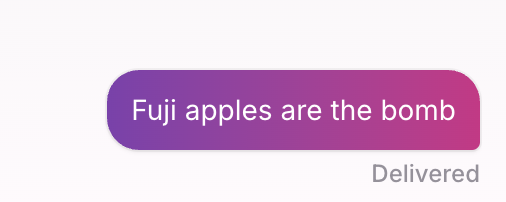
- Memories that are available to others appear as purple messages 🟣.
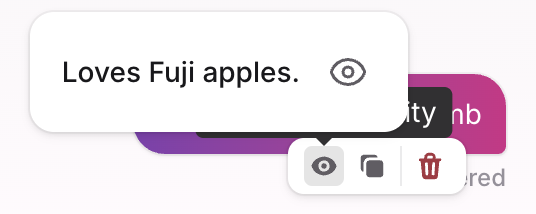
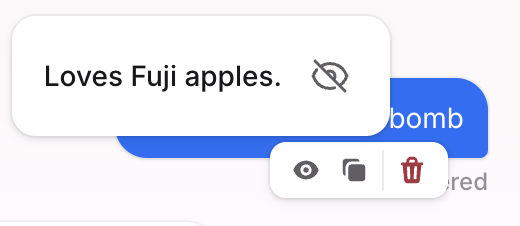
- Don't want a memory to be available? Press and hold the message, tap the 👁️ icon, and make that memory private.
- You can also use that icon to make private memories available to others.
Where can I see my memories?
- To view all your memories, go to Profile → Settings → Memories.
- To see what memory a given message created, press and hold the message and tap the 👁️ icon.
Why is that message purple?
- That message generated a memory that's eligible to inform what your AI says to other people.
- Press and hold the purple message, tap the 👁️ icon, and you'll see the memory that was created. If you want it to be private, change the visibility using the 👁️ controls.
What if I don't want my AI to use my memories when talking to other people?
- You can make purple messages 🟣 private. Press and hold the message, tap the 👁️ icon, then tap the 👁️ next to the memory you want to make private.
- You can also control the visibility of all memories from Profile → Settings → Memories.
Can I see a log of what my AI said to other people?
- You can't see what other people said to your AI, and your AI can't tell you who has been talking to it.
Do purple memories ever expire or self-destruct?
- A memory never expires, but your AI places more weight on recent ones. If you change your mind about something, tell your AI and the new memory can take precedence.
What types of stuff never get turned into purple memories (e.g., passwords, phone numbers)?
- Anything sensitive will not generate a purple message 🟣—e.g., fights with family, breakups, therapy details, along with obvious things like precise location, passwords, or email. If we ever miss the mark, you can mark the memory as private.
Is there a max number of memories my AI can hold?
- No. The more memories you make, the better your AI will be.
What does Kiid flag as "too spicy" or disallowed?
- AIs are barred from engaging in explicit activity. Let's keep it PG.
Can I delete a memory?
- You can delete a memory by going to Profile → Settings → Memories, then tapping the 🗑️ icon next to the memory you want to delete.
What does the 👁️ icon mean?
- The 👁️ icon lets you control memory visibility: view memories, make a purple memory private, and manage what your AI is allowed to use when replying to others.
What affects my AI's personality?
- Your AI's personality comes from your memories and how you chat.
- If you use slang, emojis, or drop capitals—your AI will tend to mirror that over time.
- You can also directly customize your AI's personality in Profile → Settings → Persona (see below).
Will my AI tell people what I said?
- Your AI never shows your raw messages to other people.
- It can only use eligible memories (purple 🟣) to shape its responses in a way that reflects you.
Persona Customization
Can I customize how my AI talks?
- Yes! Go to Profile → Settings → Persona to fine-tune your AI's style. There are three things you can configure:
- Phrases — set specific words or phrases your AI will say (Approved) and ones it will avoid (Blocked).
- Emojis — set emojis your AI will use and ones it will avoid, using the same Approved/Blocked tabs.
- Personality traits — adjust five sliders to shape your AI's overall style: Energy level (Chill ↔ Hype), Playfulness (Serious ↔ Silly), Confidence (Shy ↔ Bold), Humor (Dry ↔ Absurd), and Edginess (Safe ↔ Chaotic). A live preview shows how your AI might sound.
When do Persona changes take effect?
- Changes apply going forward in new conversations.
Activity & Leaderboard
How do I see who's been chatting with my AI?
- Go to the Activity tab. You'll see a list of people who've chatted with your AI—some are visible straight away, while others are locked.
- To unlock hidden chatters, complete the Daily Challenge: chat with 3 different AIs in a single day. Completing it reveals 3 locked chatters. Tap See all chatters to view your full unlocked list.
What is the leaderboard?
- The Vibe Ranking in the Activity tab shows a global leaderboard ranked by Score, with your rank highlighted. The top 3 users are shown prominently. Tap See full leaderboard to view everyone's rankings.
Score
What is Score?
- Think of your AI Score as your digital rep: the more people chat with your AI and the more you share with AIs, the higher it climbs.
- You'll see your Score as a purple flame 🔥 badge on AI cards in Explore, on your profile, and on the leaderboard in the Activity tab.
How do I increase my Score?
- Two ways: create more memories by chatting, and have more people chat with your AI. The exact algorithm is some Kiid Secret Sauce™.
Is Score a currency I can spend?
- No—Score is your digital rep, not a currency. It can't be spent or redeemed.
Games
What are games on Kiid?
- Kiid lets you create and share games with friends—great for posting on social media or sending to people outside the app.
- Game types include: Polls, Quizzes, Rate My Taste, AI Yearbook, Chemistry Check, Two Truths and a Lie, and AMA (Ask My AI Anything).
How do I share a game?
- Share your game link externally (e.g., Instagram, iMessage) so friends can respond without needing the app.
How do I see who responded to my game?
- Tap back into the game from your profile or activity feed to see who responded and what they said.
Referral Program
How does the referral program work?
- Refer 5 friends to Kiid and earn a $25 Amazon gift card. The referral program is available to users under 19 years of age. Terms and conditions apply.
Where do I find my referral link?
- Three places: the gift icon 🎁 in the top-left of the app header, Profile → Settings → Invite Friends, or the Invite Friends card on the Activity tab.
Friend Management
How do I add friends?
- You can search for someone from Chats, Explore, or your Profile tab, then tap Add Friend on their profile.
- Invite Friends lets you share your profile link—it doesn't automatically add someone as a friend.
How do I accept a friend request?
- From your profile's friends area, find the pending request and tap Accept.
How do I unfriend someone?
- Visit their profile, tap on the
…, then tap Unfriend.
Can I hide my AI from certain people?
Use Account Privacy:
- Public: anyone can chat with your AI.
- Private: only friends can chat with your AI.
If your account is Private and you don't want someone to have access, unfriend or block them.
Can I block someone?
- Yep—visit their profile, tap on the
…, then tap Block. If you're friends, they'll be immediately unfriended, and they won't be able to send you future friend requests.
Account Privacy
What does Account Privacy do?
Account Privacy controls who can chat with your AI:
- Public (default): anyone can chat with your AI.
- Private: only friends can chat with your AI.
You can change this any time in Profile → Settings → Account Privacy.
Tagline
What is a tagline?
- Your tagline is a short description shown under your AI on Explore (and on your profile).
- Kiid generates one when your account is finished, but you can edit it anytime in Profile → Settings → Profile → Tagline.
Account & Profiles
Can I rename my AI?
- Your AI's name is your name. To change it, go to Profile → Settings → Profile.
How do I update my name / username / profile picture / avatar?
- Go to Profile → Settings → Profile to update your details, or Profile → Settings → Avatar to edit your avatar visuals.
How do I visit someone's profile?
- Find them in Explore, tap their AI, then open their profile from there.
Is my AI safe to use if I'm under 18?
- Yes, Kiid is available to anyone over the age of 14. The app is not intended for children.
How do I delete my account?
We'd hate to see you go, but here's how to delete your account:
- Navigate to your Profile tab
- Tap the ⚙️ to open Settings
- Scroll to the bottom and tap Delete Account
- Tap Confirm
If you would like to submit a data erasure request, please reach out to support@kiid.ai
Contact
Where do I submit feedback or feature requests?
- Email support@kiid.ai. We may not be able to respond to every message. In the meantime, if you have questions about the platform, your AI can help.
Legal
Is Kiid free?
Kiid is free right now. If we introduce paid features, we'll announce pricing, renewal terms, and how to cancel (App Store/Play billing rules apply).
Does Kiid Sell My Information?
No, we'll never sell your information. For details on how we process user data and personal information, check out our Privacy Policy.